
Get started
1. Installer verification in progress
The RightKeyMenu installer is temporarily unavailable while we complete its security verification. A new signed and verified macOS installer will return to this page. Please do not download or install similarly named files from unofficial sources.
Once the installer is available, move the app to Applications and open it. macOS may ask you to enable the Finder extension; follow the system prompt so the menu can appear in Finder.
2. Keep the first menu small
Open Finder Menu and retain only two or three actions that you use every day. You can reorder each action, turn it off later, or restore the default configuration.
- Developers: Copy Path, Copy File Content, Create Files, Quick Actions.
- Creators: Favorite Directories, Batch Rename, Image Tools, Copy To.
- Operations: Create Files, Favorite Directories, Move To, Batch Rename.
3. Configure one real action
For example, create a template for a weekly report or project README, then test it in a Finder folder. Add a second workflow only after the first one feels natural.
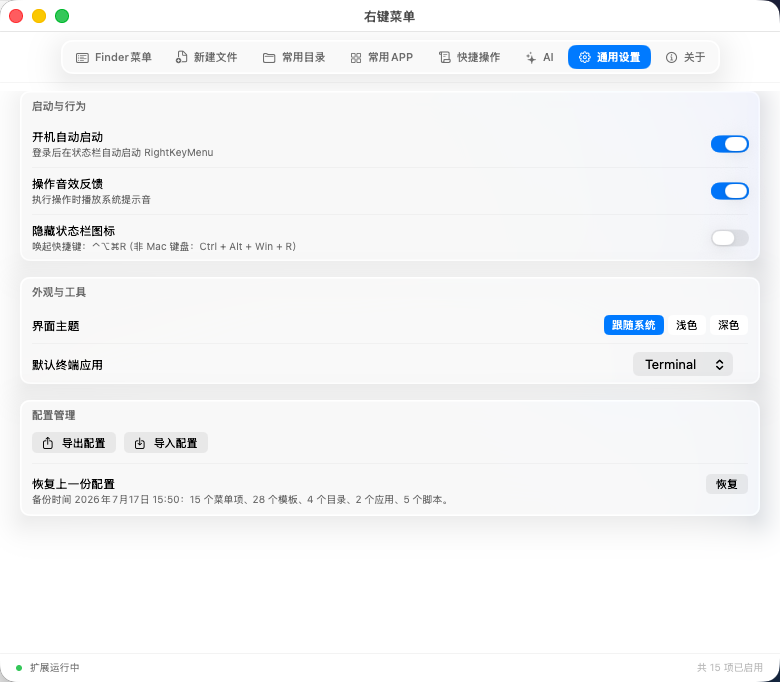
General settings also cover launch behavior, appearance, language, and configuration import/export. AI credentials are not included in exported configuration.